Frame pacing Steam app · version 0.5
framepacer.Smooth.Magic.
framepacer is an FPS limiter for Windows, sold on Steam since July 2026. It does not create a single frame: it spaces out the frames your PC already renders so each one lands exactly on time. Here is what it really does, what the measurements say, and when it is worth it.
Measure my frametimeLatence does not cap FPS: it measures whether a limiter actually helps, on your PC.
The gist in 30 seconds
It adds no frames. It makes their rhythm even.
About 99% even frames for both in the test published by the publisher. RTSS is free.
It hooks into the game: ban risk with EAC, BattlEye or Vanguard.
A more even rhythm can cost some latency. Only your own curve decides.
Contents
What is framepacer?
framepacer is a Windows app that caps a game's frames per second and spaces them at even intervals. Its goal: a flat frametime, like on a console.
It is sold on Steam by the publisher pacerio, which names no developer. It works with most DirectX games (including old DirectX 8 and DirectDraw titles), Vulkan and OpenGL, shows a live frametime graph and lets you change the target rate without leaving the game.
- Early Access release
Planned for at least six months, with the price set to rise at full release.
- Version 0.5: Nvidia Reflex arrives
Automatic Reflex limiter with DLSS Frame Generation below 50 base FPS, dynamic DLSS Multi Frame Generation, anti-cheat detection.
- Mostly positive Steam reviews
About 78% positive out of roughly 170 reviews.
Frame pacing in one picture
Frame pacing is how even the rhythm of displayed frames is. At 60 FPS, a good rhythm delivers one frame every 16.7 ms.
That is why a console game at 30 or 60 FPS often feels smoother than a PC at 80 FPS: the console game is tuned for a fixed rhythm, while the PC lets the frame rate drift. Frametime and 1% lows reveal what the average hides. The basics are in unstable frametime.
How it works
Every limiter makes the game wait. What changes from one tool to another is how precise that wait is and where it happens.
- It hooks into the game. According to a technical breakdown posted on the app's Steam forum, framepacer loads its own library (DLL) into the game process and intercepts the call that sends the frame to the screen. RTSS works on the same principle.
- It holds each frame until the right millisecond, using a high-resolution timer, instead of releasing it as soon as it is ready.
- It does not fix anything else. Shader compilation, texture streaming, CPU spikes, full video memory, network lag: none of these are rhythm problems. If your PC cannot hold the target rate, no limiter will flatten the curve.
What the measurements show
In the only published benchmark with numbers, framepacer, RTSS in Front Edge mode and Special K are tied: about 99% even frames.
Three caveats before drawing conclusions. The test comes from the publisher itself. It covers a single game and a single laptop. And it does not measure latency, which is exactly where external limiters are weakest. What it does show reliably: the "precise" limiters are equivalent, and a game's built-in limiter can fall far behind.
An independent test published by XDA on September 7, 2026, on Forza Horizon 6 with an RTX 4070 Ti Super, reaches a similar conclusion: there is no universal formula for capping FPS, and the "3 FPS below refresh rate" rule does not guarantee good 1% lows.
framepacer vs RTSS and Reflex
framepacer is not more precise than RTSS. It is simpler. Reflex remains the pick for latency, the in-game limiter for online games.
| Tool | Evenness | Low latency | Ease of use | Hooks into the game | Price |
|---|---|---|---|---|---|
| framepacerpacerio | Very high | Medium | One click | Yes | Paid |
| RTSSFront Edge Sync mode | Very high | Medium | Manual setup | Yes | Free |
| Nvidia Reflexsupported games | Good | The best | One option | No, built in | Free |
| In-game limitervaries by game | Variable | Good | One option | No | Free |
| GPU driverNvidia, AMD | Low | Good | Per game | No | Free |
Our reading, based on the measurements cited in this article. With G-Sync and driver V-Sync, Reflex already caps FPS below the refresh rate on its own. Special K, also free, reaches the same evenness but mainly targets advanced fixes for PC ports.
Anti-cheat: the real limit
Online game with anti-cheat? No framepacer.
The publisher says so itself: using it with an aggressive anti-cheat such as EAC, BattlEye or Vanguard may result in a ban, and those games are not supported.
Since version 0.5, framepacer detects the main anti-cheats to avoid attaching to them. That is a useful safeguard, not a guarantee. In practice: keep it for single-player and offline games. For Valorant, Fortnite, Apex or any ranked game, stick to the in-game limiter, Reflex or the driver.
Which limiter fits your setup
The right limiter depends on two things: whether your game has an anti-cheat, and whether your display supports G-Sync or FreeSync.
Latency matters more than perfect rhythm, and no injected tool should go near an anti-cheat.
Adaptive sync on, V-Sync in the driver. If the curve is still uneven, a precise limiter such as RTSS Front Edge or framepacer can smooth the rest.
30 or 60 FPS on 60 Hz, 40 or 60 FPS on 120 Hz: every frame stays on screen for the same number of refreshes.
If your PC regularly misses the target rate, no limiter will smooth the curve. You need headroom.
If your game already has a good limiter, or RTSS is set up properly and gives a flat curve, framepacer will probably bring no visible change. It becomes interesting when the in-game limiter is poor and you do not want to configure RTSS.
Check it on your PC
A curve published on someone else's PC does not tell you what will happen on yours. Compare for yourself, in three steps.
A built-in benchmark, an identical route or a save file: a sequence you can replay exactly.
Your current limiter, then the new one. Do not touch the driver or graphics settings in between.
Frametime and 1% low, not average FPS. Check latency too if your game shows Reflex stats.
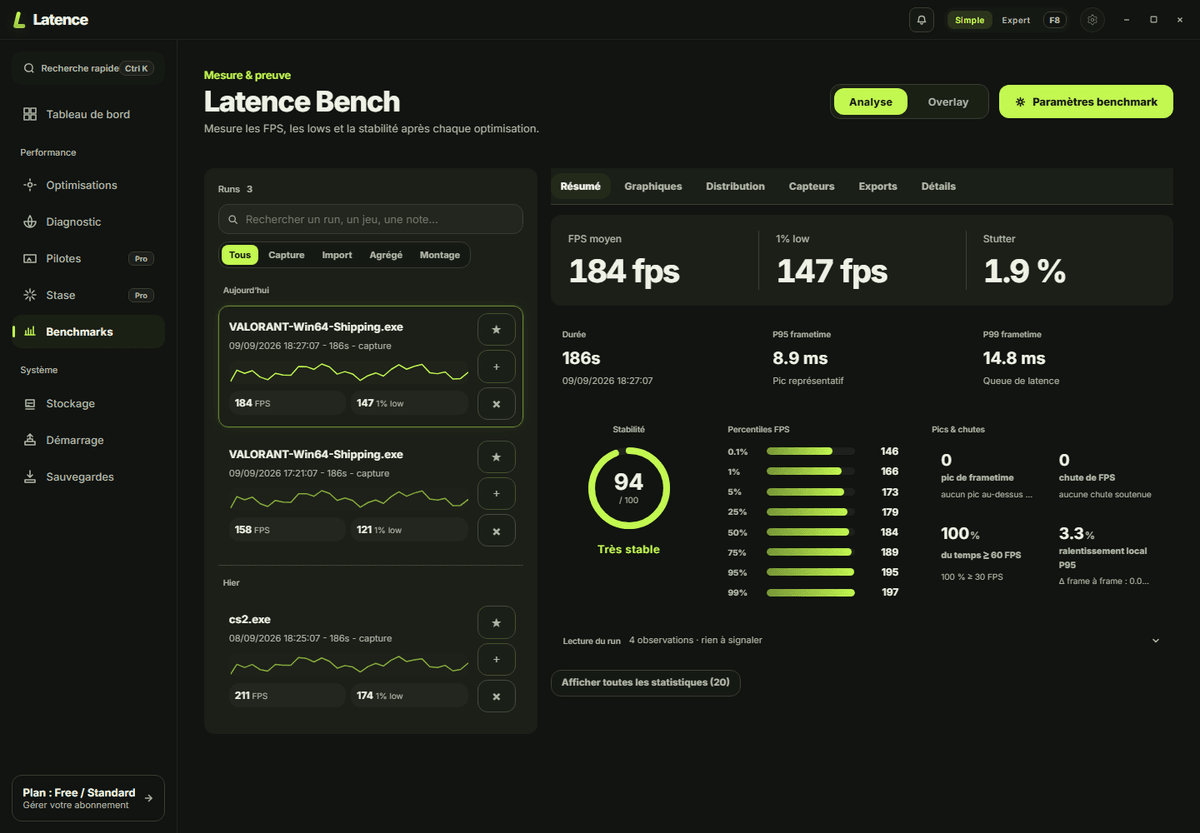
Latence does not cap FPS, so it does not replace framepacer or RTSS. Its benchmark is there to check: it reads the real display rhythm through PresentMon, Windows event tracing, without injecting anything into the game, then compares sessions before and after. Full method in FPS and frametime benchmark.
Further reading: understanding PC input lag, FPS drops on Windows and GPU drivers for gaming.
Real questions.
Is framepacer a game?
No. framepacer is an app sold on Steam: an FPS limiter for Windows that applies to the games you launch. It contains no game.
Does framepacer increase FPS?
No. It caps FPS and spaces frames at even intervals. It can make a game feel smoother, but it adds no performance. If your PC cannot hold the target rate, it will not create it.
Is framepacer better than RTSS?
Not on evenness: in the comparison published by the publisher, framepacer and RTSS in Front Edge Sync mode score almost identically, around 99% even frames. framepacer is mainly easier to use, RTSS is free.
What is a free alternative to framepacer?
RTSS (RivaTuner Statistics Server) in Front Edge Sync mode and Special K reach the same evenness in the published comparison. They take more setup. The in-game limiter or Nvidia Reflex remain the safest options for online games.
Can you get banned for using framepacer?
Yes, it is possible in games protected by aggressive anti-cheats such as EAC, BattlEye or Vanguard. The publisher warns about it and does not support those games. Use it only in single-player or offline games.
Does framepacer add input lag?
It can. To even out the rhythm, it sometimes holds back a finished frame, which makes it slightly older when displayed. Version 0.5 switches to an Nvidia Reflex based limiter when DLSS Frame Generation runs below 50 base FPS, to reduce that cost.
What is frame pacing?
It is how even the rhythm of displayed frames is. At 60 FPS, good frame pacing delivers a frame every 16.7 ms. Bad frame pacing alternates fast and slow frames, which causes stutter even with a high FPS counter.
Measure. Then choose.
Compare the frametime curve with and without the limiter, on your PC and in your game. That is the only verdict that counts.
Download LatenceSources
- framepacer Steam page: release, price, APIs, anti-cheat warning.
- framepacer.com: FAQ and release notes.
- Frame limiter comparison, by the publisher: method and figures.
- Technical breakdown, Steam forum: injection and interception.
- XDA, September 7, 2026: independent test of capping methods.